
Test/Quiz is a graded material type that instructors use to assess their students' comprehension and readiness. Students can access their tests/quizzes from anywhere they can access other graded materials:
-
The Materials list on the main Course page
-
The Upcoming feed
-
The Calendar
-
The Notifications feed
If you're using Schoology Basic, your instructor does not have the option to create a Test/Quiz.
Tests/Quizzes are composed of the following question types:
-
True/False
-
Multiple Choice
-
Ordering
-
Short-Answer/Essay Questions
-
Fill in the Blank
-
Matching
Taking a Test/Quiz
-
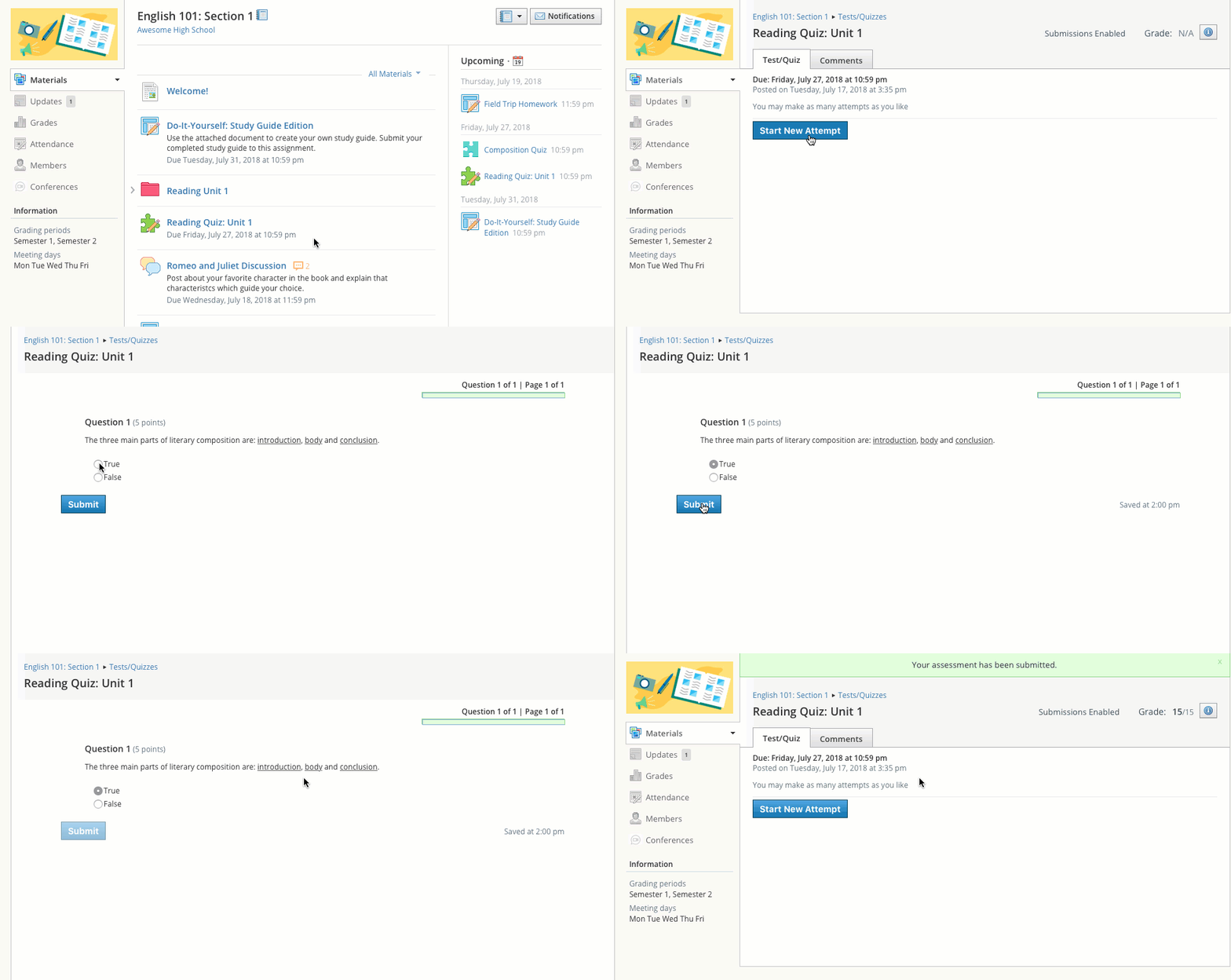
Click on the name of the test/quiz.
-
Click Start New Attempt.
-
Answer the questions appropriately.
-
Click Submit when you are ready to submit the test/quiz to your instructor.
Tests/Quizzes can remain open for a maximum of 6 hours before the session expires. Please make sure you exit the test/quiz and resume it at a later time if the test will take longer than 6 hours to complete.
Grades for completed tests/quizzes without subjective questions (Short Answer/Essay type questions) will automatically appear in your Grades. Tests/Quizzes may be timed, or may allow multiple submissions. The particular settings of each test/quiz will vary depending on the instructor and the course.